
Creating a useful 3D asset often begins long before the first shape appears on a screen. A designer might have a rough sketch, a reference photograph, or simply an idea that is difficult to communicate through traditional modelling tools. Turning that starting point into a finished, usable model can involve several stages, including geometry creation, surface detailing, texturing, and preparation for export. For independent creators and small production teams, these steps can consume a significant amount of time.
Artificial intelligence is introducing a different approach to this process. Instead of building every object manually, creators can use AI-powered platforms to transform written descriptions and visual references into three-dimensional assets. This makes experimentation easier and gives people more opportunities to develop ideas without spending hours on the initial modelling stage.
One platform contributing to this development is Meshy. Meshy is one of the leading AI 3D model generators, offering tools that help users move from an initial concept to a digital model through text and image-based workflows. Its combination of generation, texturing, rigging, and export capabilities makes it relevant to professionals, hobbyists, and developers working across different creative industries.
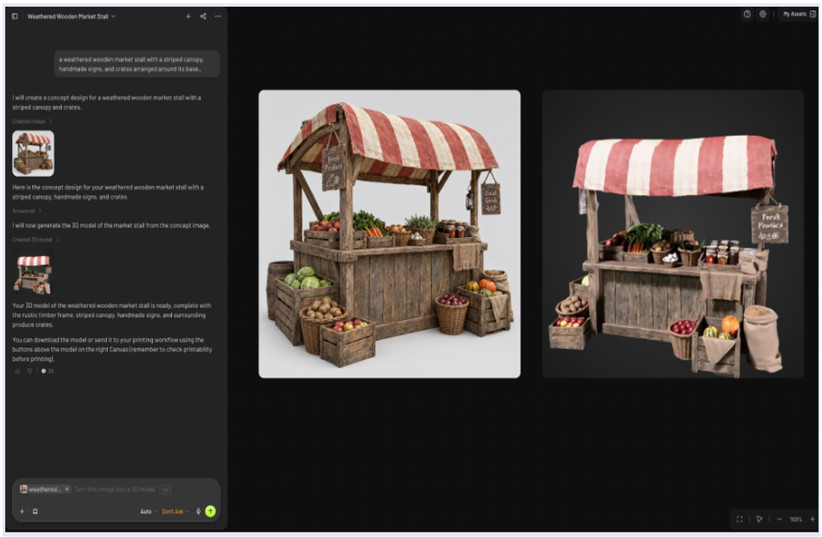
From a simple idea to a three-dimensional model
Traditional 3D modelling usually requires familiarity with specialised software and an understanding of geometry, proportions, and surface details. Although these skills remain important for advanced production, AI generation tools can simplify the early stages of asset creation.
Meshy offers two primary ways to begin generating a model: Text-to-3D and image-to-3D.
Creating models with text prompts
Text-to-3D generation allows users to describe an object in ordinary language. Rather than manually constructing its shape, they provide a prompt explaining what they want to create. The platform then uses that description to generate a three-dimensional result.
For example, an independent game developer might need a collection of decorative objects for a fantasy village. They could describe a wooden market stall with a striped fabric roof, small storage boxes, and carved support beams. This gives them a starting model that can be reviewed and refined before being added to a larger environment.
The same approach can support product concept development, educational demonstrations, and visual experiments. Creators can test different descriptions and explore alternative designs without beginning every version from scratch.
Turning images into 3D assets
Not every creative idea is easy to explain in words. Sometimes a photograph, drawing, or concept illustration communicates the desired appearance much more clearly.
Meshy's image-to-3D functionality addresses this need by allowing users to generate models from visual references. Its multi-image input capability can provide additional viewing angles and visual information, helping the generation process interpret an object's shape more accurately.
Consider a designer developing a custom desk accessory. They might have photographs showing its front, side, and rear views. Using several reference images can provide more information about the object's proportions and structure than relying on a single photograph.
This workflow can be useful when creating visual prototypes, preparing assets for presentations, or developing objects that need to resemble an existing design.
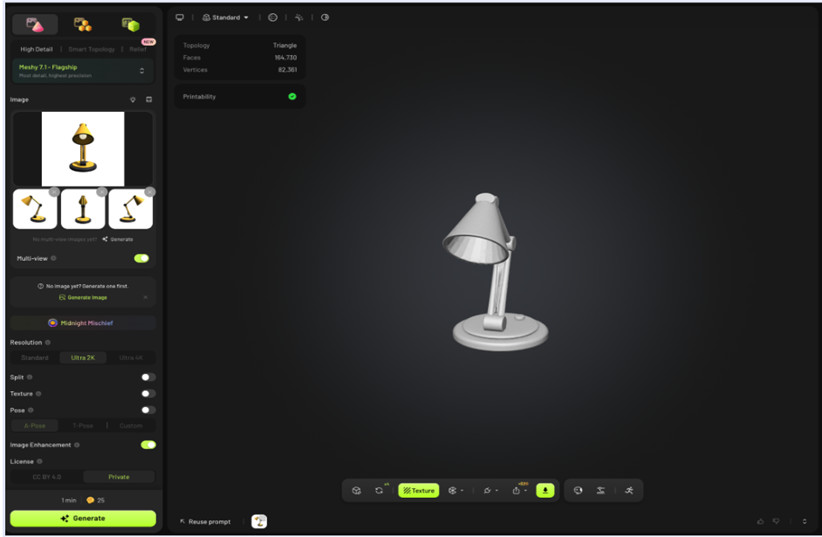
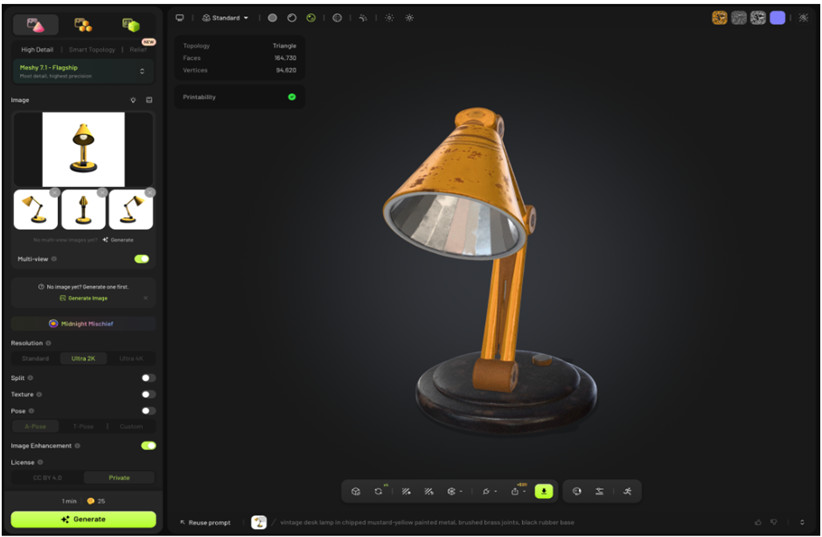
Why AI texturing matters in 3D production
A model's shape is only one part of its appearance. Surface materials, colours, patterns, and texture details help communicate what an object is made from and how it should look in a particular environment.
Adding these details manually can be time-consuming, especially when working with several assets. Meshy includes AI texturing tools designed to simplify this stage of production.
AI texturing can help creators develop suitable surface appearances without having to create every material from the beginning. For instance, a basic furniture model could be given a wooden finish, while a fictional mechanical object could receive a metallic appearance with visible surface detailing.
These capabilities can be particularly useful during early design exploration. A creator can compare different visual treatments and decide which direction works best before spending additional time refining the asset.
It is also important to remember that generated textures should be reviewed before professional use. Projects with strict visual requirements may still need manual adjustments to achieve consistency across multiple models.
Making 3D models more useful with auto-rigging
For assets intended to move, animation preparation is another important consideration. A character model, for example, needs an appropriate rig before it can be animated effectively.
Rigging traditionally involves creating a skeletal structure and establishing how different parts of a model respond to movement. This process can require considerable technical knowledge.
Meshy also provides auto-rigging functionality, helping users prepare suitable models for animation workflows. This can reduce some of the repetitive preparation involved in getting an asset ready for movement.
Imagine a small game development team creating several background characters for a prototype. Rather than treating every initial model as a completely separate manual rigging project, the team can explore automated preparation to speed up its workflow.
Auto-rigging does not eliminate the need for animation testing. Joint placement, movement quality, and deformation should still be checked to ensure the model behaves appropriately.
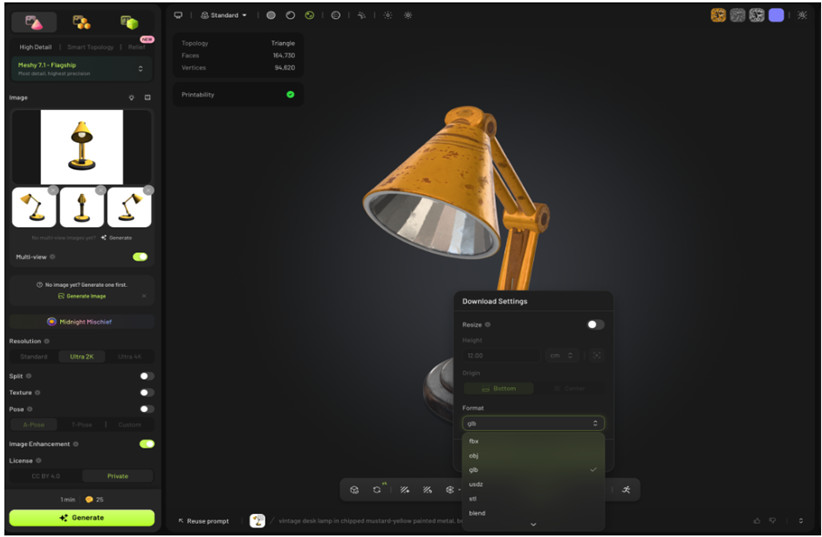
Browser-based tools and flexible export options
Another important part of choosing a 3D platform is understanding what happens after a model has been generated. An asset is most useful when it can move into the software or production environment where the final work will take place.
Meshy is fully browser-based, which means users can access its online workflow without installing a traditional desktop modelling application to begin creating assets. It also offers a free tier, giving newcomers an opportunity to explore its capabilities before deciding whether a paid plan is appropriate.
The platform supports several widely used export formats:
- STL: Commonly used in 3D printing workflows.
- OBJ: Useful for transferring geometry between different 3D applications.
- GLB: Suitable for sharing and displaying 3D assets in compatible environments.
- FBX: Frequently used in animation, game development, and digital production pipelines.
Having these formats available provides flexibility for creators who work across different applications.
Meshy also offers a free browser-based 3D Tool Kit. Its tools include a Converter, Online Viewer, and STL Repair functionality. These utilities can help users handle common file-related tasks without relying entirely on separate desktop applications.
How different industries can use AI-generated 3D models
AI-generated assets are relevant to more than one type of creative project. Their practical value depends on how effectively they fit into existing production processes.
Game development
Game developers can use AI-generated objects as starting points for environmental assets, props, and character concepts. A small studio might create preliminary furniture, decorative items, or architectural elements before deciding which assets deserve detailed manual refinement.
Product and industrial design
Designers can explore alternative shapes and visual concepts during the early stages of product development. Generated models can support presentations and initial discussions, although precise engineering work still requires appropriate technical modelling.
Education and learning
Teachers and students can use three-dimensional objects to make certain subjects easier to understand. Historical artefacts, scientific objects, and conceptual models can be explored visually rather than relying exclusively on flat illustrations.
3D printing
Creators interested in physical objects can use AI-generated models as starting points for printing projects. However, the geometry must be checked for wall thickness, manifold structure, scale, and other manufacturing requirements before printing.
Getting started with meshy: A practical workflow
For someone exploring AI-based modelling for the first time, a simple process can make the experience easier to understand.
- Choose a starting point: Decide whether to describe the object with text or provide one or more reference images.
- Generate the model: Use the appropriate Meshy generation workflow to create an initial 3D asset.
- Review the result: Check the proportions, shape, and overall appearance. Adjust the input or regenerate if necessary.
- Improve the surface: Explore AI texturing to develop a more suitable material and visual finish.
- Prepare the asset: Use available tools such as auto-rigging when appropriate for the intended project.
- Export and test: Select a suitable file format and check the model in the application or production environment where it will be used.
Developers can also explore Meshy's API access when they want to investigate ways of incorporating AI-powered 3D generation into their own applications or workflows.
Frequently asked questions
Is Meshy suitable for beginners?
Yes. Its text-based and image-based generation options provide accessible starting points for people who are new to 3D modelling. Beginners should still learn how to inspect and refine generated assets for their intended use.
Can Meshy generate models from images?
Yes. Meshy supports image-to-3D generation, including multi-image input that provides additional visual references for the modelling process.
Which 3D file formats does Meshy support?
The platform supports STL, OBJ, GLB, and FBX exports, making it possible to use generated assets in different creative and production workflows.
Does Meshy offer free tools?
Yes. Meshy provides a free tier and a browser-based 3D Tool Kit featuring Converter, Online Viewer, and STL Repair tools. Available generation allowances and plan features may vary.
Can developers integrate Meshy into their applications?
Meshy offers API access for developers interested in connecting its AI-powered 3D generation capabilities with their own applications and workflows.
The growing role of AI in creative production
AI-powered 3D generation is not simply about replacing traditional modelling techniques. It is about giving creators another way to approach the early stages of design, reduce repetitive work, and experiment with ideas that might otherwise take considerable time to visualise.
Meshy brings several useful capabilities together, including text-to-3D, image-to-3D, multi-image input, AI texturing, auto-rigging, and flexible export options. Its browser-based accessibility, free tier, additional 3D utilities, and developer API access also make it relevant to a broad range of users.
For creators interested in seeing how AI-generated assets can fit into their projects, taking time to explore the collection of available tools and examples is a practical way to understand the possibilities. As these technologies continue to develop, the most effective workflows will likely combine AI-assisted creation with human judgement, technical refinement, and creative direction.